We want to have all of our solutions looking the same.
Font we use: Helvetica
Size of font: 14
Color of text: Black
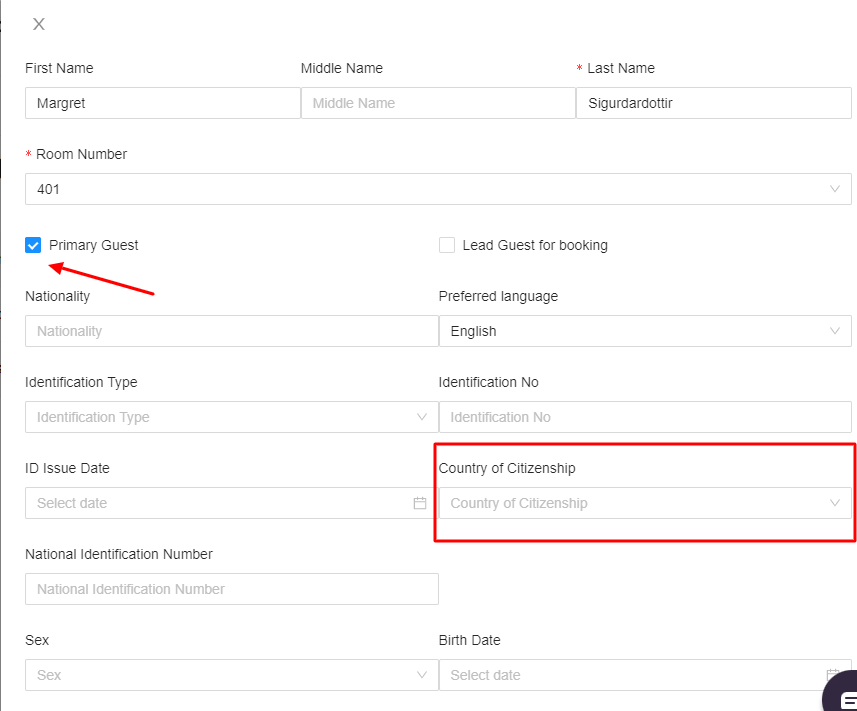
If we have pictures/screenshots please add a red box or an arrow for navigation.
The extension that you can add to google chrome that is nice to use is called Awesome Screenshot
If the article is long please add Headers to be able to add a table of content for the customer.
Example of a solution:
A short text to introduce what the solution is about
TABLE OF CONTENTS
- What font to use
- Size of font
- Color of text
- Screenshots
- Long solutions
- Header size
- How to add table of content
What font to use
We use Helvetica
Size of font
We use 14pt
Color of text
Black
Screenshots
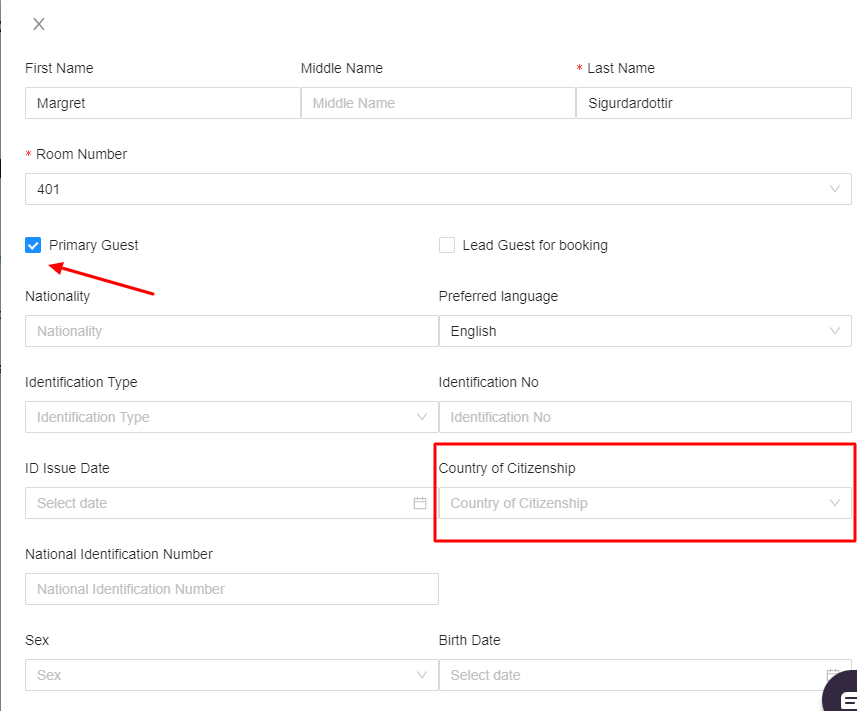
If we have pictures/screenshots please add a red box or an arrow for navigation.
Long solutions
If the article is long please add Headers to be able to add a table of content for the customer.
Header size
24pt and Bold
How to add table of content
If you have added the header, you simple need to click on the place you want the table of content to appear and select TOC

Was this article helpful?
That’s Great!
Thank you for your feedback
Sorry! We couldn't be helpful
Thank you for your feedback
Feedback sent
We appreciate your effort and will try to fix the article