1. Gathering all the information needed from the customer when receiving a support request
When receiving a support request from a customer, we need to ensure we have all the information we need to check the issue and reproduce it so we can document it further for the developers, if needed.
What we need from the customer is the account name, the email address where they can receive updates on the ticket, the subject of the issue, and a detailed issue description.
We should also ask the customer to explain the issue they are experiencing with as much detail as possible and to include, if relevant: which part of the system is affected, what are the steps to reproduce the issue if they have them, booking reference, folio/invoice/receipt reference and date, when did they start to experience the issue and for how long has it been going on. We also need to know how is this affecting their usage of the system, what is expected to happen, if any errors are showing on their screen or if they took any troubleshooting steps already.
The attachments from the customers should include, if possible, screenshots with the issue marked, screen recordings of the issue and relevant files, such as exported reports.
2. Testing
It is important for us to filter the requests before sending the tickets to the developers. We first need to exclude a clear cache issue, internet connection, or hardware-related issue. We should also check if there is a simple explanation to the issue or something that we can fix on the support side and teach the customer how to fix it in the future.
If, after testing it, we realize it is a system bug, we need to make sure we have the steps to reproduce it and show it to the developers. We also need to check if the issue is occurring on more or all the accounts.
3. Creating a ticket in Asana
To create a ticket for the developers in Asana, we use the following form:
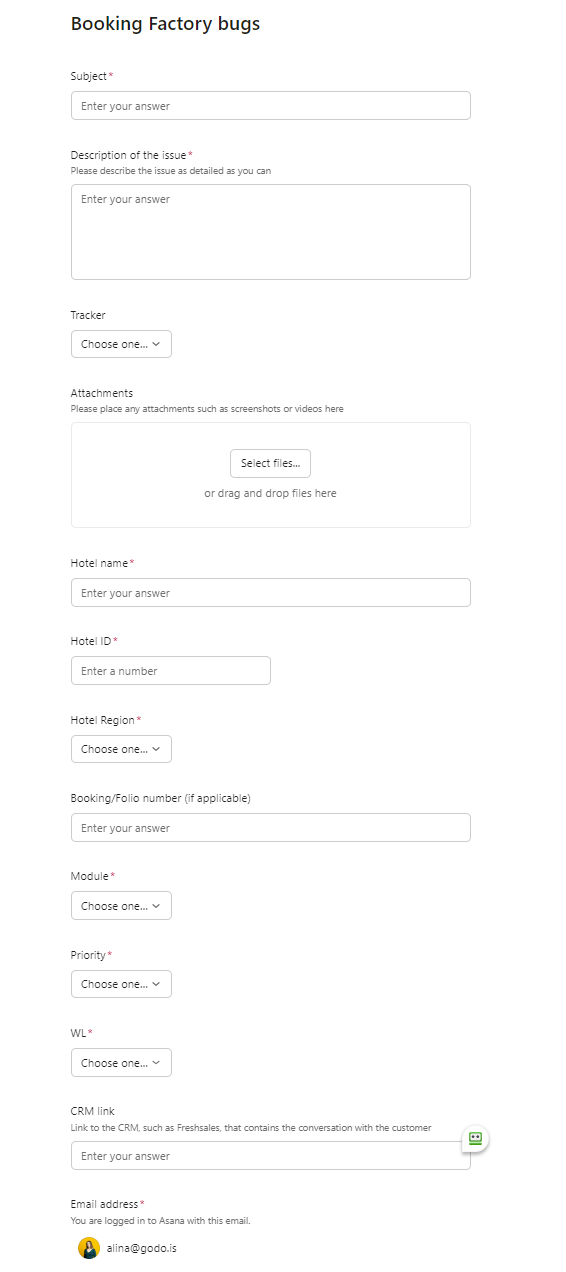
4. Following the ticket and closing a ticket
We should be following the status of the support ticket and we can usually see if there is any update or change in our email inbox. When the ticket is set as resolved by the developers, we should check it on our side, check with the customer, and if it is all fixed, set the status of the ticket to 'closed' by editing the ticket. It is also good to keep the customer updated on the progress of their tickets.
Was this article helpful?
That’s Great!
Thank you for your feedback
Sorry! We couldn't be helpful
Thank you for your feedback
Feedback sent
We appreciate your effort and will try to fix the article